
ClearMechanic Basic3.25.06 - App Store
You'll be able to see results in few seconds.
Publisher Description
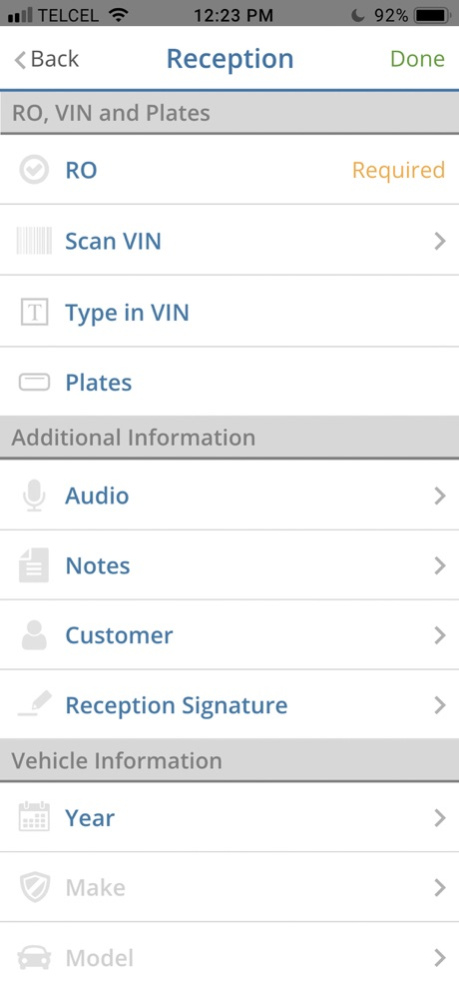
ClearMechanic Basic is the first multi-point vehicle inspection program designed for smartphones and tablets. With ClearMechanic Basic, a service center can upload a custom vehicle inspection from any smartphone or tablet and instantly share the inspection form by e-mail, text message, website and print-out.
ClearMechanic Basic is designed specifically for automotive service centers and is the newest product launched by ClearMechanic, Inc., the award-winning mobile and web developer with over 10,000 registered technicians in North America, South America, Western Europe and Asia. We have been featured in Consumer Reports, Automotive News, Edmunds Inside Line and numerous trade publications.
Why is ClearMechanic Basic changing the automotive service process across the globe? Because we are the FIRST inspection program to do the following:
THE FIRST INSPECTION PROGRAM YOUR TECHNICIANS WILL ACTUALLY USE
We have spent years refining ClearMechanic's Basic technology to create an easy, repeatable inspection process.
THE FIRST INSPECTION FORM YOUR CUSTOMERS WILL UNDERSTAND AND TRUST ClearMechanic Basic is easy for technicians to complete and even easier for your customers to understand. The use of inspection photos and videos and Red / Yellow / Green priority levels will validate your technician’s inspection findings.
THE FIRST INSPECTION PROGRAM OPTIMIZED FOR SMARTPHONES *AND* TABLETS
ClearMechanic Basic is the first inspection technology compatible with smartphones and tablets. Technicians have the option to use their own smartphones instead of inefficiently sharing a workstation or tablet.
THE FIRST INSPECTION FORM CUSTOMIZABLE TO YOUR SERVICE CENTER
ClearMechanic Basic lets each service center build its own electronic, multi-point inspection tailored to its needs. Note: this is for ClearMechanic Basic clients only! There is a standard inspection form in our application for demonstration purposes.
THE FIRST INSPECTION PROGRAM THAT DOESN'T REQUIRE SERVICE CENTERS TO PURCHASE NEW HARDWARE
Other inspection programs only work on certain tablets and are not compatible with most smartphone devices. This forces service centers to buy expensive new hardware instead of giving technicians the choice to perform inspections from devices they feel comfortable with.
THE FIRST INSPECTION FORM VIEWABLE BY E-MAIL, SMS, WEB SITE AND PRINT-OUT VERSION
After uploading inspections through ClearMechanic Basic, the inspection can be viewed and shared by e-mail, SMS text message, web site or print-out version. Note: some of these features are for ClearMechanic Basic clients only!
THE FIRST INSPECTION PROGRAM THAT SHOWS CONSUMERS REAL-TIME INSPECTION PHOTOS, VIDEOS, AUDIO AND EXPERT DIAGRAMS
Seeing is believing! ClearMechanic Basic lets service centers show visual proof that a recommendation is valid. This is the 'wow' factor you need to build trust with the average customers who does not trust the automotive industry.
DESIGNED FOR: MECHANICS, TECHNICIANS, SERVICE ADVISORS, REPAIR SHOPS, DEALERSHIPS, AUTO REPAIR, VEHICLE INSPECTIONS, AUTO INSPECTIONS, AUTO MECHANICS, CAR REPAIR, VIN SCANNING, AUTO REPAIRS
Start using the ClearMechanic Basic app today!
May 27, 2024
Version 3.25.06
UPDATE!
[New] Now you can enjoy the "Customizable fields" functionality on the "Reception" screen.
[New] The "Conversations" screen was added to respond agilely to your customer's messages.
[New] "JETOUR" brand and new models have been included in the vehicle information.
About ClearMechanic Basic
The company that develops ClearMechanic Basic is ClearMechanic, Inc.. The latest version released by its developer is 3.25.06.
To install ClearMechanic Basic on your iOS device, just click the green Continue To App button above to start the installation process. The app is listed on our website since 2024-05-27 and was downloaded 0 times. We have already checked if the download link is safe, however for your own protection we recommend that you scan the downloaded app with your antivirus. Your antivirus may detect the ClearMechanic Basic as malware if the download link is broken.
How to install ClearMechanic Basic on your iOS device:
- Click on the Continue To App button on our website. This will redirect you to the App Store.
- Once the ClearMechanic Basic is shown in the iTunes listing of your iOS device, you can start its download and installation. Tap on the GET button to the right of the app to start downloading it.
- If you are not logged-in the iOS appstore app, you'll be prompted for your your Apple ID and/or password.
- After ClearMechanic Basic is downloaded, you'll see an INSTALL button to the right. Tap on it to start the actual installation of the iOS app.
- Once installation is finished you can tap on the OPEN button to start it. Its icon will also be added to your device home screen.
Program Details
System requirements
Download information
Pricing
Version History
version 3.25.06
posted on 2024-05-27
May 27, 2024
Version 3.25.06
UPDATE!
[New] Now you can enjoy the "Customizable fields" functionality on the "Reception" screen.
[New] The "Conversations" screen was added to respond agilely to your customer's messages.
[New] "JETOUR" brand and new models have been included in the vehicle information.
version 3.24.01
posted on 2024-03-07
Mar 7, 2024
Version 3.24.01
UPDATE!
- [New] More than one digital signature from team members can be added to the Order.
version 3.23.15
posted on 2024-02-01
Feb 1, 2024
Version 3.23.15
UPDATE!
- [New] More than one digital signature from team members can be added to the Order.
- [Fix] Crash fixed
version 3.23.06
posted on 2023-09-03
Sep 3, 2023
Version 3.23.06
UPDATE!
-Improvements have been implemented in the user experience on the following screens: "Orders", "Notifications", "Add Audio", "Order Details", and in the pop-up "New Inspection?" to ensure consistency with the CM web app.
-Bug fixed! If integrated with a DMS, the "Tower" field on the "Reception" screen will only be mandatory if the DMS specifies it as such.
version 3.23.05
posted on 2023-08-18
Aug 18, 2023
Version 3.23.05
UPDATE!
-Mobile app updated to sync with web app versions 2.3 and 2.7 Clear Mechanic One Solution. This is part of a general redesign of the ClearMechanic One Solution.
-If you want to learn more about the redesign and try it out, please contact their WhatsApp support group.
version 3.20.04
posted on 2023-03-06
Mar 6, 2023
Version 3.20.04
UPDATE!
-The mobile app has been updated to synchronize with ClearMechanic One Solution web app versions 2.2 and 2.3. This is part of a general redesign of ClearMechanic One Solution.
-If you would like to learn more about the redesign and try it, please contact your WhatsApp support group.
version 3.16.1
posted on 2022-08-20
Aug 20, 2022 Version 3.16.1
UPDATE!
- Bug fixed! Whenever the user scans a VIN number, the app no longer crashes.
- Bug fixed! While typing a VIN number previously registered, it will automatically fill out the final customer and vehicle information.
- Bug fixed! Whenever the user types in the “Notes” screen, the text can now be visualized.
version 3.13.10
posted on 2021-01-22
Jan 22, 2021 Version 3.13.10
UPDATE!
- From the Private Dashboard, the user can be restricted to not add custom inspection items.
- Bug Fixed! The user is able to edit the RO number of an existing RO from the "Reception" screen without creating a new RO without inspection items.
version 3.13.03
posted on 2019-05-28
May 28, 2019 Version 3.13.03
UPDATE!
- New name! We changed our name from ClearMechanic Plus to ClearMechanic Basic to standardized our names between iOS and Android versions. In that way, provide a better user experience.
version 2.13.01
posted on 2013-08-20
Disclaimer
Official App Store Link
We do not host ClearMechanic Basic on our servers. We did not scan it for viruses, adware, spyware or other type of malware. This app is hosted by Apple and passed their terms and conditions to be listed there. We recommend caution when installing it.
The App Store link for ClearMechanic Basic is provided to you by apps112.com without any warranties, representations or guarantees of any kind, so access it at your own risk.
If you have questions regarding this particular app contact the publisher directly. For questions about the functionalities of apps112.com contact us.
